What is RPM in AdSense? Complete Guide for Publishers
If you have been running Google AdSense on your website or YouTube channel for even a few weeks, you have probably come across the term RPM in your earnings dashboard. And if you are like most publishers, you probably glanced at the number, felt a little confused about what it actually meant, and moved on without fully understanding it.
Here is the thing RPM might be the single most important metric in your entire AdSense account. More important than your total earnings. More important than your click-through rate. Why? Because RPM tells you exactly how efficiently your content is generating revenue, regardless of how much traffic you have. A small blog with excellent RPM can out-earn a much bigger site with poor RPM. Understanding this one number can completely change how you think about growing your website or channel.
In this guide, we will break down exactly what RPM means, how it is calculated, what separates a good RPM from a poor one, and practical steps you can take to improve it. We will also clear up the confusion between RPM and CPM, which trips up even experienced content creators.
What is RPM?
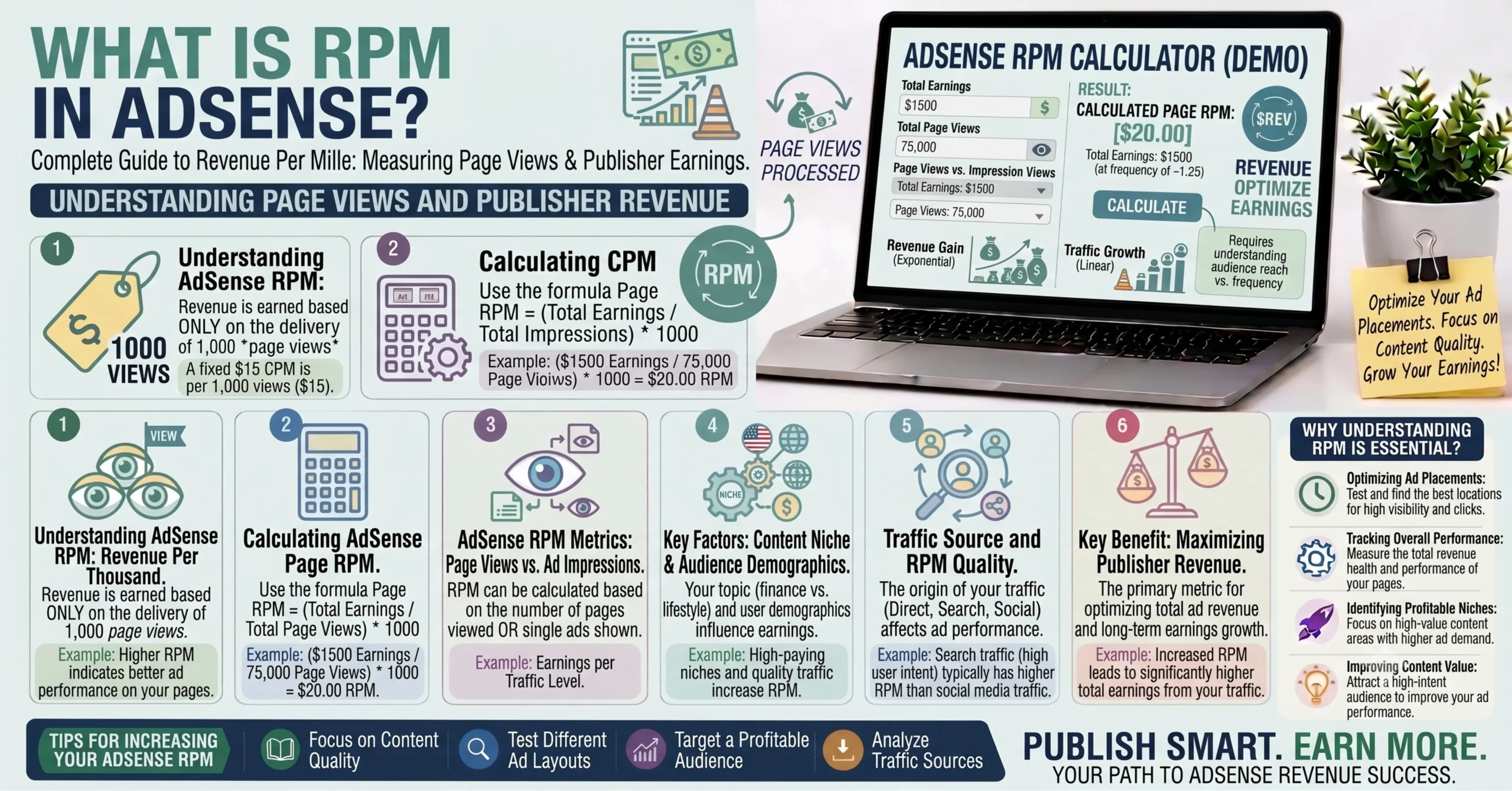
RPM stands for Revenue Per Mille “mille” being the Latin word for thousand. In simple terms, RPM tells you how much money you earn, on average, for every 1,000 pageviews or ad impressions your content generates.
This is a critical distinction to understand: RPM is not what advertisers pay. It is what you, the publisher or content creator, actually earn after Google takes its share. Google has generally shared roughly two-thirds of ad revenue with publishers under its standard AdSense for Content program, keeping the remainder as its platform fee. So your RPM already reflects your net earnings, not the gross amount changing hands in the ad auction.
RPM appears throughout your AdSense dashboard as a way to measure performance across pages, ad units, countries, and time periods making it the go-to metric for understanding where your revenue is actually coming from.
Page RPM vs Impression RPM An Important Distinction
Something that confuses almost every new AdSense user is that there are actually two different types of RPM shown in your dashboard, and they are not interchangeable.
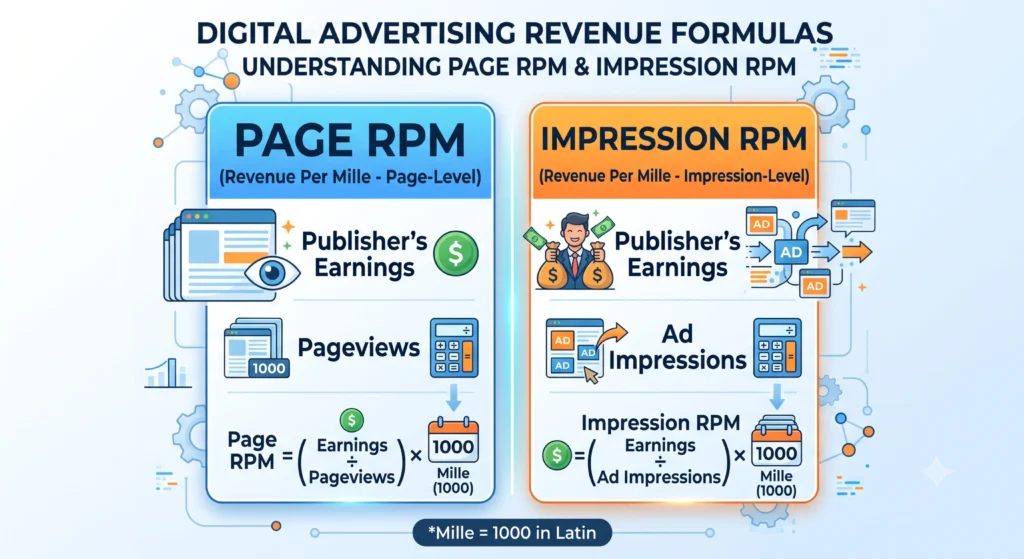
- Page RPM measures your earnings per 1,000 pageviews. Since a single page can display multiple ad units, Page RPM reflects the combined earnings from all the ads on that page, divided by the number of times the page was viewed.
- Impression RPM measures your earnings per 1,000 individual ad impressions meaning each ad unit displayed counts separately, even if several appear on the same page.
Here is why this matters: if your page shows three ad units and a visitor views the page once, that counts as one pageview but three ad impressions. Page RPM will naturally be higher than Impression RPM on the same page, simply because it is measuring a different unit of activity. When comparing your performance to industry benchmarks or to other publishers, always confirm which RPM type is being discussed otherwise you are comparing two different things.
The RPM Formula
- Page RPM = (Estimated Earnings ÷ Number of Pageviews) × 1,000
- Impression RPM = (Estimated Earnings ÷ Number of Ad Impressions) × 1,000
Worked Examples
- Example 1: Estimated Earnings: $45 | Pageviews: 15,000 | Page RPM = $3.00
- Example 2: Estimated Earnings: $120 | Ad Impressions: 48,000 | Impression RPM = $2.50
- Example 3: Estimated Earnings: $310 | Pageviews: 62,000 | Page RPM = $5.00
Rather than calculating this by hand every time, you can simply enter your earnings and traffic numbers into our free RPM Calculator at InnovaiTools and get your result instantly with no sign-up required.
RPM vs CPM Stop Confusing These Two
This is probably the single most common point of confusion in the entire ad revenue conversation, so let us settle it clearly.
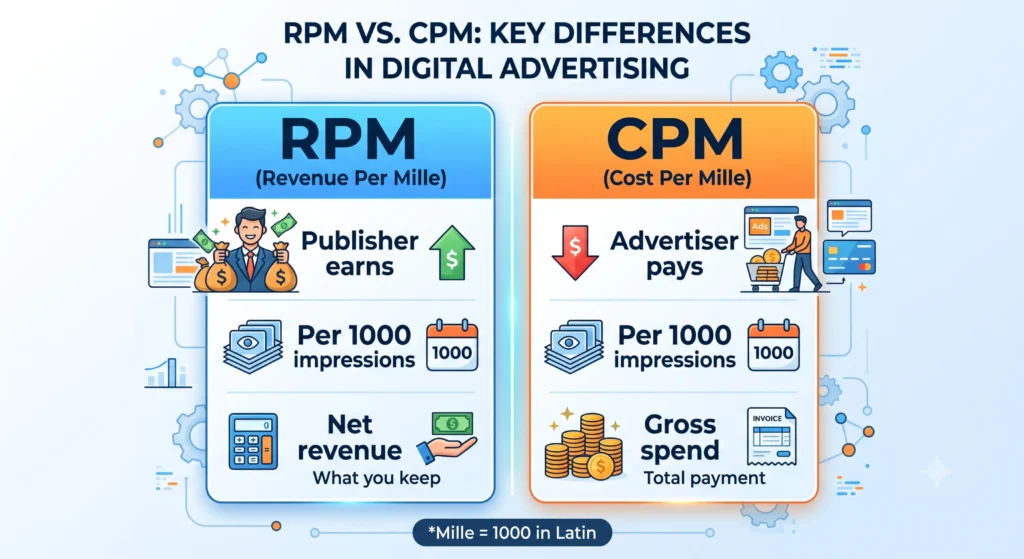
RPM (Revenue Per Mille) is what you, the publisher, earn per 1,000 impressions or pageviews. It is a publisher-side metric, and it reflects your actual take-home revenue.
CPM (Cost Per Mille) is what an advertiser pays per 1,000 ad impressions in a campaign. It is an advertiser-side metric, and it reflects the gross spend before any platform fees are deducted.
Here is the relationship between them: when an advertiser pays a $5.00 CPM to show their ad, Google’s ad exchange takes its cut, and what remains gets distributed to the publisher as RPM. Since Google typically shares around two-thirds of that revenue, a $5.00 CPM might translate to roughly $3.30 or so in Impression RPM for the publisher though the exact split can vary by ad format and auction dynamics.
If you want to understand the advertiser side of this relationship in more depth, our free CPM Calculator breaks down exactly how advertising costs are calculated.
What is a Good RPM?
This is the question every publisher asks, and unfortunately, there is no single universal answer — because RPM varies enormously based on niche, audience location, device type, and season. That said, here are some general patterns publishers commonly report across different content categories:
- Finance, insurance, and legal niches tend to see the highest RPMs, often reaching well into double digits, because advertisers in these industries bid aggressively for high-intent audiences.
- Technology, business, and education content typically sees moderate-to-strong RPM, reflecting decent advertiser demand without the intensity of finance.
- Health, lifestyle, and how-to content usually falls in the mid-range, with solid but unspectacular advertiser competition.
- General entertainment, memes, and casual content tend to see the lowest RPM, since advertisers in these spaces are often working with smaller budgets and lower-value audiences.
Rather than fixating on a specific dollar target, a more useful approach is to track your own RPM over time and focus on steadily improving it which brings us to the factors that actually influence this number.
Factors That Affect Your RPM
Niche and Content Topic
As covered above, some topics simply attract higher-paying advertisers than others. This is often the single biggest lever affecting your RPM, and it is worth considering when choosing what to write about.
Traffic Geography
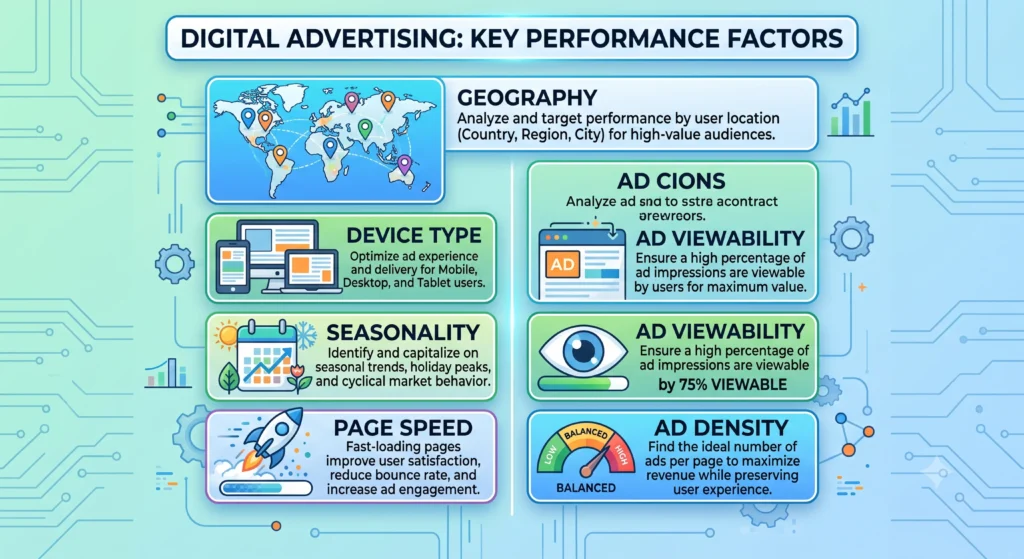
Advertisers pay significantly more to reach audiences in countries with strong purchasing power commonly referred to as Tier 1 countries, including the United States, United Kingdom, Canada, and Australia. Traffic from these regions typically generates a noticeably higher RPM than traffic from regions with lower average ad spend.
Device Type
Desktop traffic has historically generated somewhat higher RPM than mobile traffic, largely due to larger ad real estate and different advertiser bidding behavior. However, this gap has been narrowing steadily as mobile ad formats and mobile ad spend continue to mature.
Seasonality
RPM tends to rise sharply during the fourth quarter of the year, particularly around November and December, as advertisers compete heavily for visibility during the holiday shopping season. Many publishers see their best monthly earnings of the year during this period, even without a corresponding traffic increase.
Ad Viewability and Placement
Ads that are actually seen by users meaning they load within the visible viewport and stay on screen earn more than ads buried far down a page or hidden behind other elements. Thoughtful ad placement near high-engagement content typically improves RPM.
Page Load Speed
Slow-loading pages cause ads to fail to render before a visitor leaves, directly reducing the number of billable impressions your page generates. Faster sites consistently see better ad performance.
Ad Density
While it may seem logical that more ads mean more revenue, excessive ad density often backfires. Too many ads hurt user experience, increase bounce rate, and can actually reduce your overall RPM by degrading the quality of each individual ad slot.
How to Use the InnovaiTools RPM Calculator
Calculating your RPM manually is simple, but our free tool makes it instant. Here is how to use it:
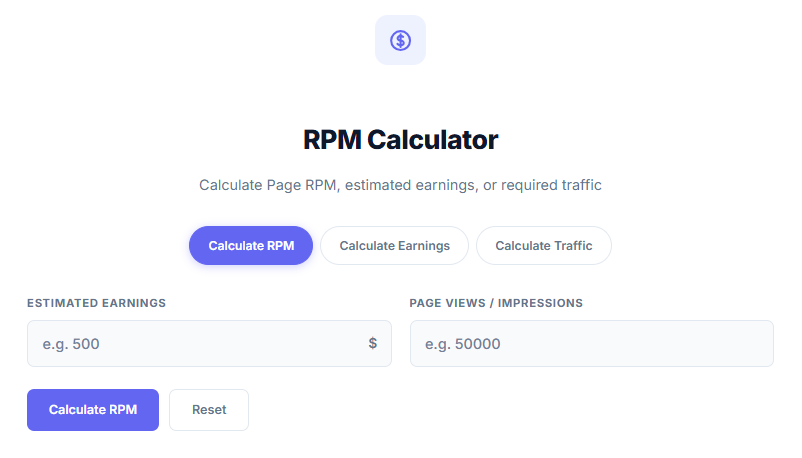
- Open the RPM Calculator on InnovaiTools.
- Enter your total estimated earnings for the period you want to analyze.
- Enter your total pageviews or ad impressions for that same period.
- Click Calculate.
- Your RPM appears instantly, giving you a clear number to track and compare over time.
Use the calculator weekly or monthly to monitor trends, compare performance across different content categories, or evaluate the impact of changes you make to your site.
How to Increase Your RPM Practical Tips
- Focus on Higher-Value Topics: If your niche allows it, covering subtopics that naturally attract finance, technology, or business-related advertisers can meaningfully lift your RPM over time.
- Target Tier 1 Traffic: Invest in SEO and content strategies that attract organic search traffic from the United States, United Kingdom, Canada, and Australia, where advertiser competition is strongest.
- Improve Page Speed: A faster site means more ads actually get seen and counted, directly increasing your billable impressions.
- Optimize Ad Placement: Position ads where users naturally look near the top of content, within the body text, and around highly engaging sections without overwhelming the page.
- Increase Pageviews Per Session: Strong internal linking between related articles and tools keeps visitors browsing longer, generating more impressions per visit without needing more total traffic.
- Prioritize Organic Search Traffic: Search traffic tends to monetize better than social media traffic, since search visitors often arrive with higher intent and spend more time engaging with content.
- Avoid Overloading Pages With Ads: Stick to a reasonable number of well-placed ad units rather than maximizing quantity this protects both user experience and long-term RPM.
- Review Performance by Country and Device: Use your AdSense reports to identify which traffic segments perform best, and lean into content strategies that attract more of that audience.
RPM Across Different Platforms
It is worth noting that RPM works a little differently depending on the platform. Website RPM, as discussed throughout this guide, is calculated from AdSense for Content earnings on your blog or site.
YouTube RPM, on the other hand, reflects a broader mix of revenue sources including ads, YouTube Premium subscriber revenue, and other monetization features divided across total views rather than pageviews. This is why YouTube creators often see RPM figures reported differently from website publishers, even within similar niches.
If you run both a website and a YouTube channel, avoid directly comparing the two RPM figures, since they are measuring somewhat different revenue streams and audience behaviors.
Frequently Asked Questions About RPM
Q1: What does RPM stand for in AdSense? RPM stands for Revenue Per Mille, meaning your estimated earnings per 1,000 pageviews or ad impressions. It reflects your net earnings as a publisher, not the advertiser’s gross ad spend.
Q2: What is the difference between RPM and CPM? RPM is what a publisher earns per 1,000 impressions. CPM is what an advertiser pays per 1,000 impressions. RPM is generally lower than CPM because it reflects the publisher’s share after the ad platform’s fee.
Q3: What is a good RPM for a blog? It varies significantly by niche, audience location, and season. Finance and business content tends to earn the highest RPM, while general entertainment content tends to earn the lowest. Rather than comparing to an industry average, focus on improving your own RPM over time.
Q4: Why does my RPM fluctuate so much? RPM is influenced by many factors including seasonality, traffic geography, device mix, and advertiser demand — all of which change from day to day and month to month.
Q5: Does more traffic mean higher RPM? Not necessarily. RPM measures earnings efficiency per 1,000 views, not total earnings. A smaller site with highly targeted, high-value traffic can have a much higher RPM than a larger site with broad, low-value traffic.
Q6: Why is my RPM higher in November and December? Advertisers significantly increase ad spend during the holiday shopping season, driving up competition and prices in ad auctions — which typically boosts publisher RPM during this period.
Q7: Does mobile traffic have lower RPM than desktop? Historically, yes, though this gap has narrowed considerably as mobile ad formats have matured. The difference today is often smaller than many publishers assume.
Q8: How can I check my RPM without doing math? Simply enter your earnings and pageviews or impressions into our freeRPM Calculator at InnovaiToolsfor an instant result.
Q9: Is Page RPM the same as Impression RPM? No. Page RPM is based on total pageviews, while Impression RPM is based on total ad impressions. Since one page can contain multiple ad units, these two figures are usually different.
Q10: Can I improve my RPM without more traffic? Yes. Improving page speed, ad placement, content topic focus, and targeting higher-value audience segments can all raise your RPM independent of traffic volume.
Final Thoughts
RPM is more than just another number in your AdSense dashboard it is a direct reflection of how efficiently your content turns attention into revenue. Once you understand how it is calculated and what influences it, you can make far more strategic decisions about the content you create, the audiences you target, and the traffic sources you prioritize.
Rather than chasing traffic alone, start paying closer attention to your RPM trends. A modest increase in RPM, applied across your existing traffic, can often deliver more revenue growth than doubling your visitor count with a fraction of the effort.
Use our free RPM Calculator at InnovaiTools anytime you want a quick, accurate read on your earnings efficiency. Track it regularly, experiment with the factors covered in this guide, and watch how small, consistent improvements compound over time.

Arid is a web developer and computer expert who specializes in building practical utility web applications. With a strong focus on technical problem-solving and user experience, he develops efficient online calculators and writing tools designed to help students, bloggers, and professionals streamline their daily tasks.