AdSense Metrics Every Publisher Should Know
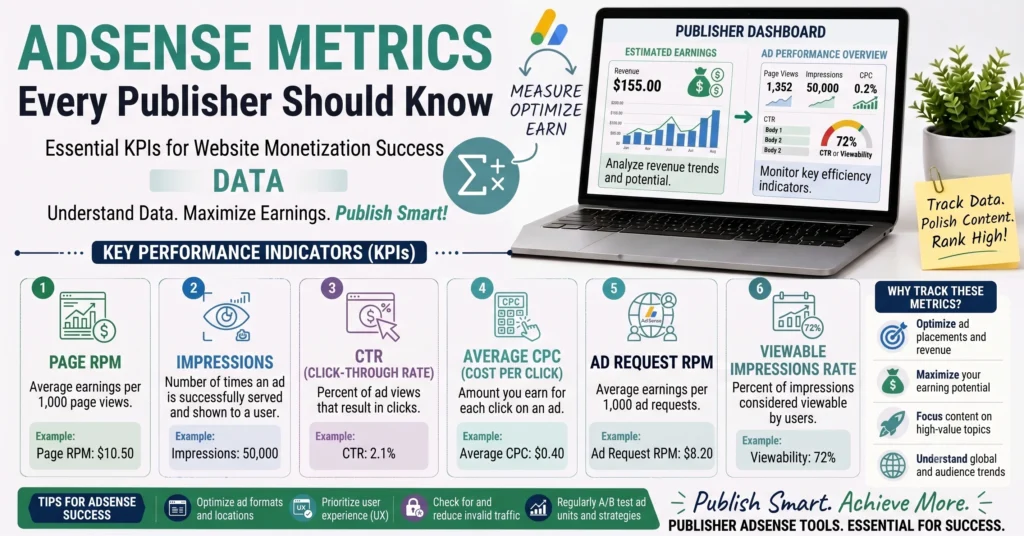
Open the Performance tab in any AdSense dashboard and you’ll find a lot more numbers than most publishers actually pay attention to. Most people check estimated earnings, maybe glance at RPM, and stop there which means genuinely useful signals about what’s actually happening to their revenue go unnoticed. Understanding how the full set of publisher metrics connects to each other turns a dashboard full of disconnected numbers into an actual diagnostic tool.
This guide brings together the metrics that matter most for any AdSense publisher building on the deeper dives already available on RPM and CPM individually, and introducing three genuinely important metrics that don’t get nearly enough attention: CTR, eCPM, and viewability, plus fill rate, which quietly explains a lot of “why does my revenue feel low” confusion.
The Publisher Metrics Landscape More Than Just Earnings
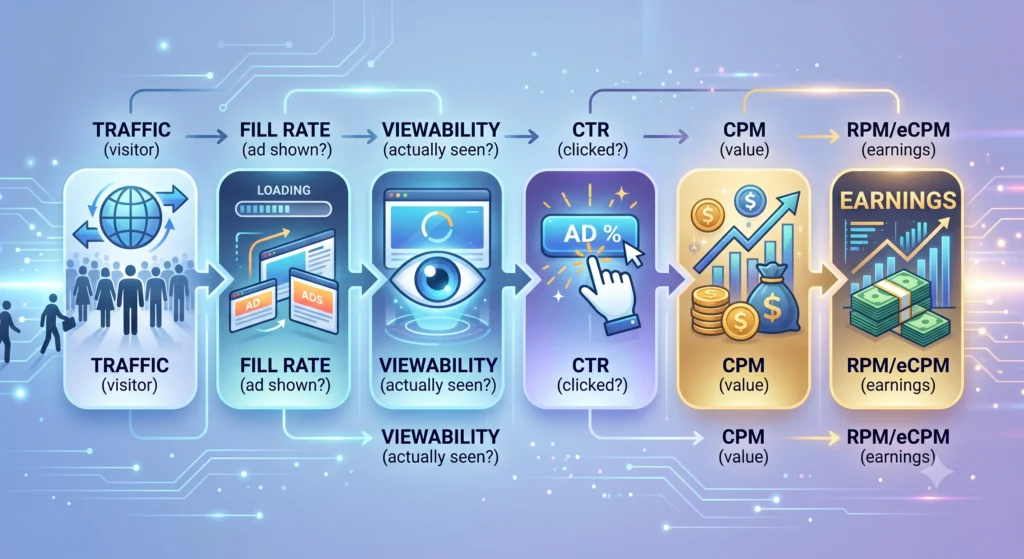
Estimated earnings tells you the outcome, but it doesn’t tell you why that outcome happened, or what specifically to change if you want it to improve. The metrics covered in this guide each isolate one part of the chain between a visitor landing on your page and revenue actually showing up in your account traffic becoming ad requests, ad requests becoming impressions, impressions becoming genuinely seen impressions, and some of those impressions converting into clicks or simply being valued highly by advertisers. Understanding each link in that chain is what lets you diagnose a revenue problem instead of just watching a number go up or down without knowing why.
RPM Your Core Efficiency Metric
RPM measures your earnings per 1,000 impressions or pageviews, and it’s the single best summary metric for how efficiently your content is converting traffic into revenue. Our full guide on RPM in AdSense covers the formula, the distinction between Page RPM and Impression RPM, and the factors that drive it up or down worth reading in full if RPM specifically is what you’re trying to improve. For this guide’s purposes, the key thing to know is that RPM sits downstream of nearly every other metric covered below it’s the final efficiency number those other metrics ultimately explain.
CPM Understanding the Advertiser Side
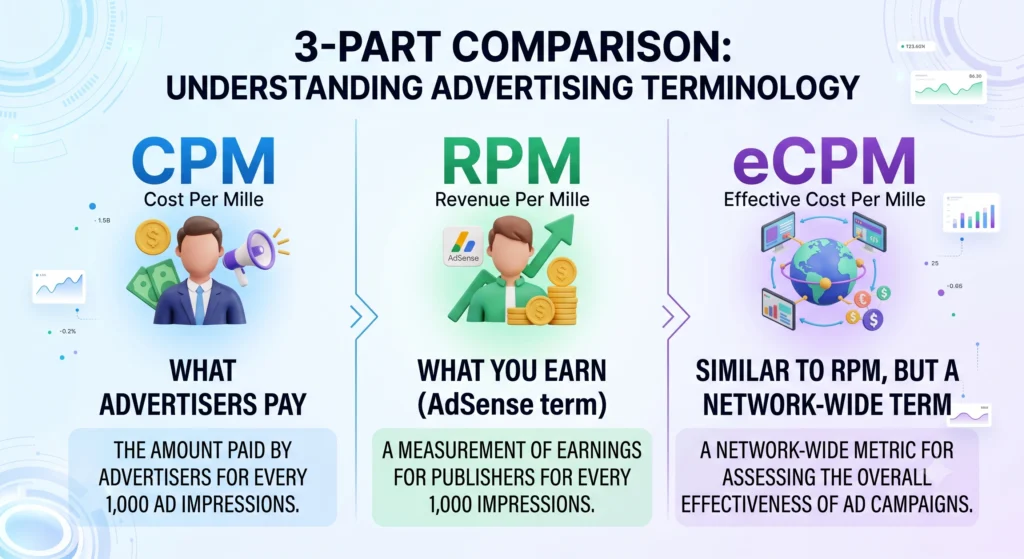
CPM measures what advertisers pay per 1,000 impressions, representing the opposite side of the same transaction RPM measures from the publisher’s perspective. Our full guide on CPM in digital advertising covers the formula and how CPM compares to other advertiser pricing models like CPC and CPA. The relationship between the two is straightforward: advertisers pay CPM, the ad platform takes its share, and what remains becomes your RPM.
CTR The Metric That Connects Traffic to Revenue
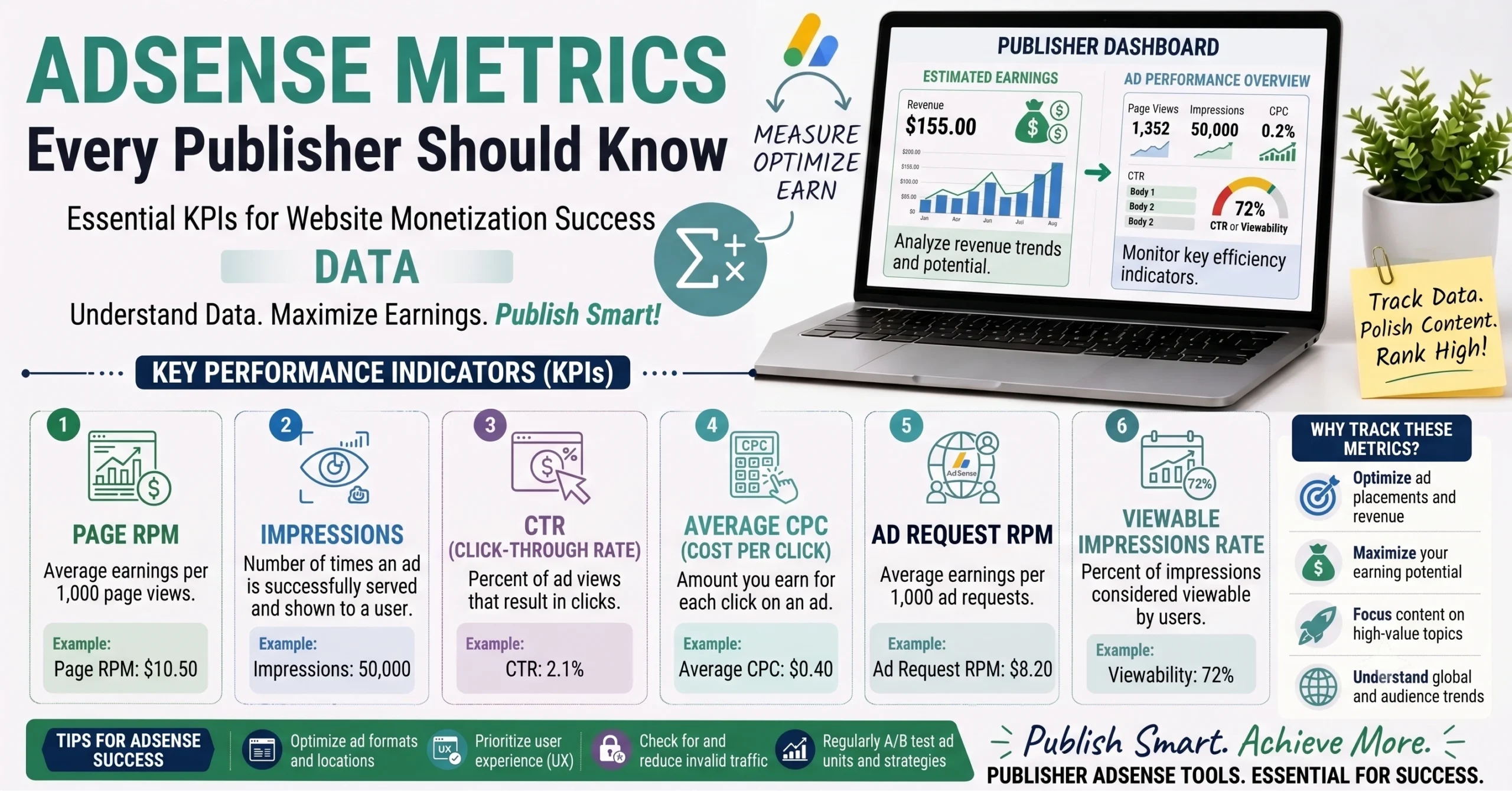
Click-through rate measures the percentage of ad impressions that result in an actual click, calculated as clicks divided by impressions, multiplied by 100. It’s a genuinely important metric because AdSense revenue comes from a mix of pricing models some ads are priced per click, others per impression and CTR directly affects how much you earn from the click-priced portion of that mix.
A page can have strong impressions and still underperform on revenue if CTR is low, since a large audience that never clicks generates far less from click-based ad units than a smaller, more engaged audience would. CTR is influenced heavily by ad placement and relevance ads positioned near genuinely engaging content, and ads that match what your audience is actually interested in, consistently outperform ads dropped into low-attention areas of a page regardless of how many total impressions those areas generate.
eCPM The Great Equalizer Metric
Effective CPM, or eCPM, expresses your actual earnings regardless of whether they came from click-priced, action-priced, or impression-priced ads as a single standardized “per 1,000 impressions” figure. The calculation is essentially identical to RPM: total earnings divided by total impressions, multiplied by 1,000.
The distinction is mostly about context rather than math. RPM is the term AdSense specifically uses for this calculation. eCPM is the broader digital advertising industry’s term for the same underlying concept, and it becomes genuinely useful once you’re working with more than one ad network, since different platforms sometimes report their own metrics differently. Converting everything to eCPM gives you an apples-to-apples way to compare performance across networks that don’t otherwise use the same terminology.
Viewability Why an “Impression” Isn’t Always Seen
Viewability measures whether an ad was actually rendered somewhere a user could realistically see it, rather than simply loaded somewhere on the page. Industry practice generally considers a display ad “viewable” once at least half of its pixels have been visible on screen for roughly one continuous second a standard designed to separate ads that genuinely had a chance to be noticed from ones that loaded off-screen or flashed by too quickly to register.
This distinction matters because an ad that technically loaded but sat below the fold, unseen by a visitor who never scrolled that far, delivers little real value to an advertiser even though it may still register as an impression in some contexts. This is part of why thoughtful ad placement near content people actually read tends to outperform simply adding more ad units to a page quantity of impressions matters less than the quality of attention each one actually receives.
Fill Rate When Ads Don’t Show At All
Fill rate measures the percentage of ad requests that actually receive an ad to display, calculated as filled requests divided by total requests, multiplied by 100. Sometimes an ad slot requests an ad and none is available to serve insufficient advertiser demand for that specific traffic segment, an unusual ad size, or a geographic mismatch can all leave a slot blank.
A low fill rate quietly caps your potential revenue even when your RPM on the impressions that do get filled looks perfectly healthy, since a meaningful portion of your total traffic simply isn’t generating any ad revenue at all. If your overall earnings feel lower than your RPM would suggest they should be, fill rate is one of the first places worth checking.
How These Metrics Work Together A Dashboard Walkthrough
Following the actual chain from traffic to revenue makes the relationship between all of these metrics concrete. A visitor lands on your page, triggering an ad request. Fill rate determines what percentage of those requests actually receive an ad to display. Of the impressions that do get filled, viewability determines how many were actually rendered somewhere a visitor could realistically see them. Of those genuinely viewable impressions, CTR determines how many convert into a click, for the portion of your inventory priced that way. CPM represents what advertisers were willing to pay for access to your specific audience in the first place, driving the value of the whole chain upstream. And RPM, or equivalently eCPM, summarizes the entire chain’s end result as a single efficiency number your actual earnings per 1,000 impressions, after everything above it has already happened.
How to Use Our RPM and CPM Calculators Together
Our RPM Calculator gives you an instant read on your own earnings efficiency whenever you want to check it, using your actual earnings and impression figures. Our CPM Calculator lets you explore what advertisers might be paying to reach an audience like yours, useful context if you’re trying to understand where your RPM sits relative to the broader advertising market for your niche. Using both together gives you a clearer picture than either number provides on its own.
Common Mistakes When Reading AdSense Metrics
- Mistake 1: Only checking estimated earnings and never looking at RPM trends, missing early signals of declining efficiency before they show up as a bigger drop in total revenue.
- Mistake 2: Confusing eCPM with CPM eCPM reflects what you actually earned, standardized per 1,000 impressions, while CPM specifically refers to what advertisers pay, which are related but distinct figures.
- Mistake 3: Assuming every impression carries equal value, without accounting for viewability differences between a well-placed ad and one sitting in a rarely-seen part of the page.
- Mistake 4: Not checking fill rate when overall earnings feel disappointing despite a healthy RPM, missing a gap where a portion of traffic simply isn’t generating any ad revenue at all.
Key Terms Related to AdSense Metrics
- CTR (Click-Through Rate): The percentage of ad impressions that result in a click, calculated as clicks divided by impressions.
- eCPM (Effective CPM): Actual earnings expressed as a standardized rate per 1,000 impressions, regardless of the underlying pricing model that generated them.
- Viewability: Whether an ad was rendered in a position and duration that gave a visitor a realistic chance to see it, as opposed to simply loading somewhere on the page.
- Fill Rate: The percentage of ad requests that actually receive an ad to display, out of total requests made.
Frequently Asked Questions About AdSense Metrics
Q1: What is the difference between RPM and eCPM? They use essentially the same calculation. RPM is AdSense’s specific term for it, while eCPM is the broader industry term used across different ad networks and pricing models.
Q2: What is a good CTR for display ads? This varies significantly by niche, placement, and traffic source, so it’s more useful to track your own CTR trend over time than to compare against a fixed industry benchmark.
Q3: What does viewability mean in advertising? It refers to whether an ad was actually rendered somewhere a visitor could realistically see it, generally defined as at least half the ad’s pixels visible for around one continuous second.
Q4: What is fill rate and why does it matter? Fill rate measures what percentage of your ad requests actually receive an ad to display. A low fill rate caps potential revenue even when RPM on filled impressions looks healthy.
Q5: How are RPM, CPM, and CTR related? CPM reflects what advertisers pay for your audience, CTR affects how much of your click-priced inventory converts, and RPM summarizes the end result of that whole chain as your actual earnings efficiency.
Q6: Why is my RPM low even with high impressions? Several factors can explain this, including low CTR, poor viewability due to ad placement, or simply operating in a lower-value niche — reviewing each metric individually helps narrow down the actual cause.
Q7: Can I compare eCPM across different ad networks? Yes, converting each network’s earnings to a standardized eCPM figure gives you a fair, apples-to-apples comparison even when networks report their own metrics differently.
Q8: What counts as a viewable impression? Industry practice generally requires at least 50% of an ad’s pixels to be visible on screen for roughly one continuous second, though exact standards can vary by ad format and network.
Q9: Does ad placement affect viewability? Significantly ads positioned within content people actually scroll through tend to have much higher viewability than ads placed far below the fold or in rarely-viewed page sections.
Q10: Can InnovaiTools help me calculate these metrics? Yes, our freeRPM CalculatorandCPM Calculatorhandle the two most central calculations instantly, using your own earnings and impression figures.
Final Thoughts
A dashboard full of metrics only becomes useful once you understand how they connect to each other fill rate determining how many requests become impressions, viewability determining how many of those get genuinely seen, CTR determining how many convert, and RPM summarizing the whole chain into one efficiency number. The next time your earnings shift in a direction you didn’t expect, working backward through this chain, rather than just watching the total, is what actually tells you where to look.
For the two most central calculations in that chain, use our free RPM Calculator and CPM Calculator at InnovaiTools and pair them with the full guides linked throughout this post for a deeper look at either metric specifically.

Arid is a web developer and computer expert who specializes in building practical utility web applications. With a strong focus on technical problem-solving and user experience, he develops efficient online calculators and writing tools designed to help students, bloggers, and professionals streamline their daily tasks.