Plain Text vs. Rich Text: Why It Actually Matters for Writers
Have you ever spent hours perfecting a document on your laptop getting the margins just right, picking the perfect font only to email it to someone else, and they open a chaotic mess of overlapping words and broken spacing?
If you have experienced that specific kind of panic, you have collided with the fundamental problem of “rich text.”
A document that looks flawless on your screen can easily arrive looking completely different on someone else’s. Fonts get substituted, spacing shifts, and formatting quietly breaks. This is almost never an issue with plain text files. Understanding the actual, under-the-hood technical difference between plain text and rich text explains not just why this formatting disaster happens, but why so many developers, professional authors, and copywriters deliberately choose plain text for drafting their work.
Let’s break down what genuinely separates plain text from rich text, the hidden compatibility problems rich text quietly causes, a massive privacy risk (metadata) that most people never think about, and exactly when you should be using each format.
What is the Actual Difference Between the Two?
It is easy to think of text as just… text. But your computer treats these two formats like entirely different languages.
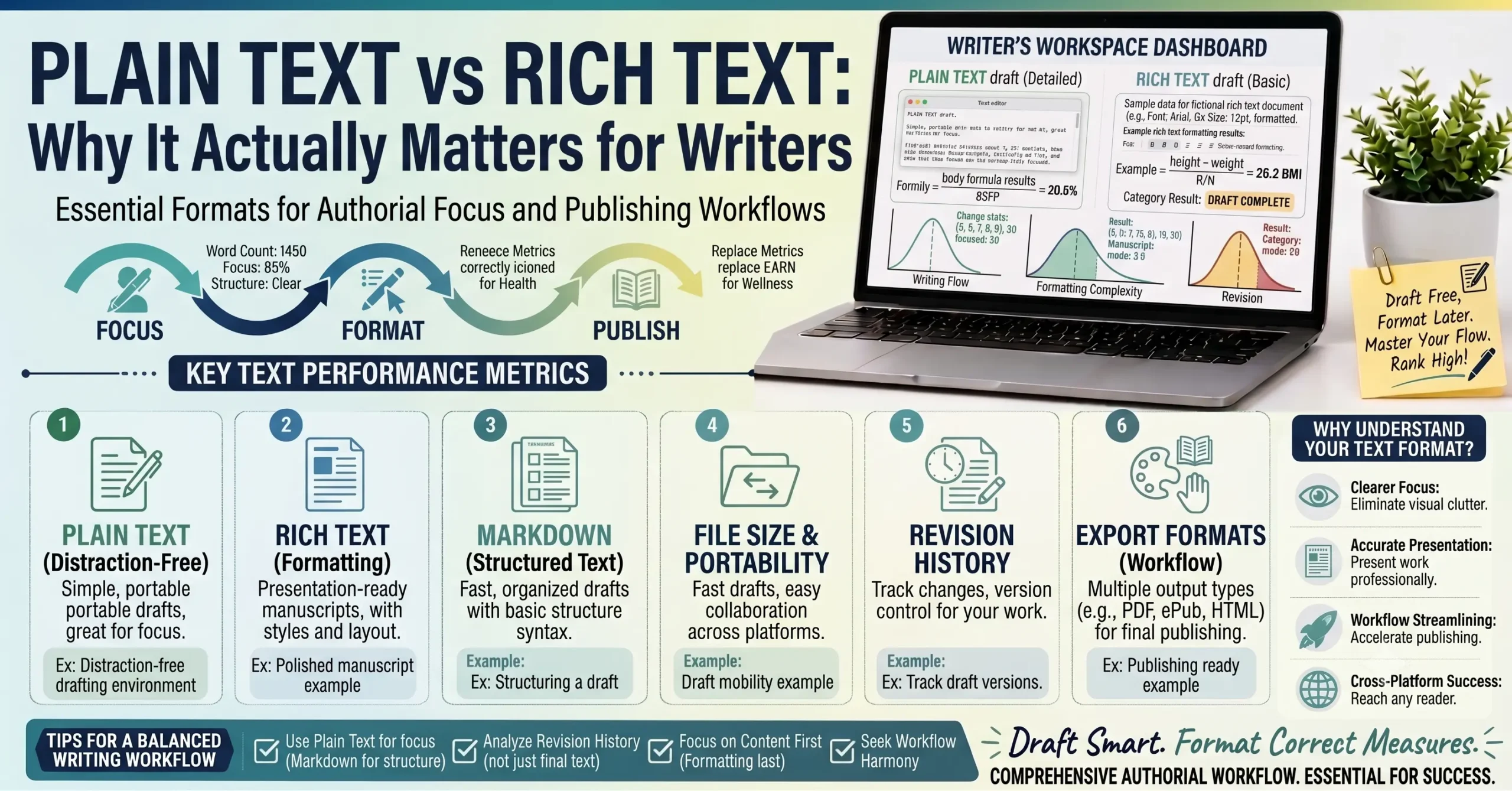
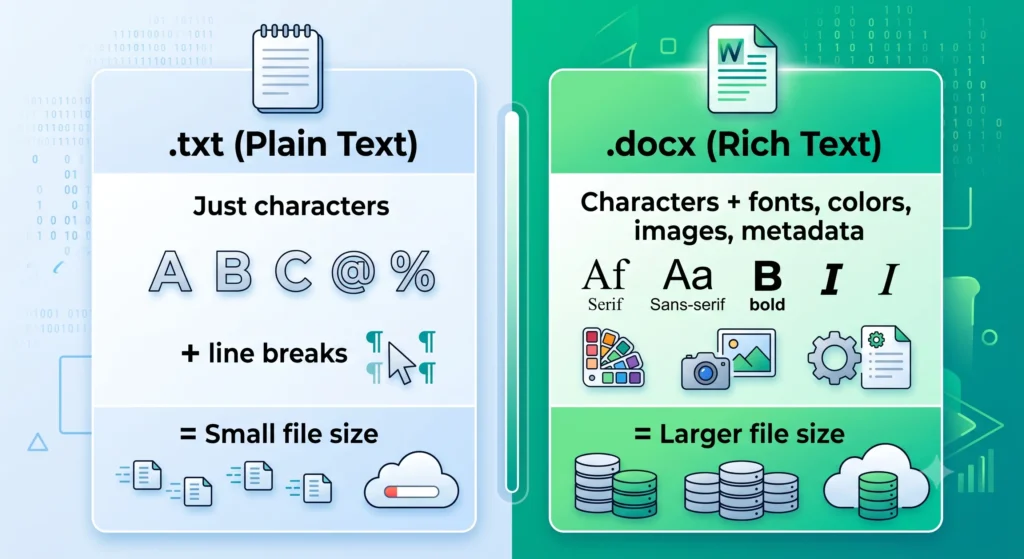
Plain text contains absolutely nothing but the characters themselves. We are talking about letters, numbers, standard punctuation, and line breaks. That is it. There is no hidden code telling the computer what color the text should be, how big it should be, or what font to use.
Rich text, on the other hand, contains those same visible characters, but it adds a massive, invisible layer of embedded formatting instructions. These hidden codes tell the software, “Make this sentence bold, turn this word red, center this paragraph, and use the Times New Roman font.” Rich text can also carry embedded images, tracked changes, and hyperlink structures all packaged alongside the actual words.
This distinction isn’t just about how a document happens to look on your screen right now it is about what information is physically stored inside the file itself.
What Makes a File “Plain Text”?
Plain text files typically use the .txt file extension. However, most source code files (like .html or .py), configuration files, .csv data files, and Markdown files are also fundamentally plain text.
The defining superpower of a plain text file is its immortality and universality. A plain text file created on a massive desktop computer in 1995 will open identically on a brand-new smartphone today. It opens in any text editor, on any operating system (Windows, macOS, Linux, Android), with absolute zero risk of the text rendering differently or arriving “corrupted.”
Why? Because there is nothing complex for the program to misinterpret. Plain text relies on standard character encoding (most commonly UTF-8 today), which is universally understood by virtually every single digital device on the planet.
What Makes a File “Rich Text”?
Rich text files use extensions like .docx for Microsoft Word documents, .rtf specifically for Rich Text Format, or proprietary formats from tools like Apple Pages.
Internally, these files are incredibly complex. If you were to look at the raw data of a Word document, you wouldn’t just see your essay. You would see thousands of lines of XML code describing the exact visual structure of the page, the embedded font files, and the margins.
Rendering a rich text file correctly depends entirely on the receiving software (like Microsoft Word or Google Docs) perfectly interpreting all of those complex embedded instructions. And that is exactly where things go wrong.
The Compatibility Nightmare: Why Rich Text Breaks
As mentioned earlier, a .txt file displays byte-for-byte identically whether you open it on a Mac, a PC, or a phone.
A .docx file’s appearance, however, depends entirely on the specific software and the specific version doing the rendering. If you create a highly formatted rich text document using a special font you downloaded, and you send it to a friend who doesn’t have that font installed, their software has to guess what to do. It substitutes a different font, which changes the size of the words, which pushes a paragraph onto the next page, which completely ruins your carefully crafted layout.
This is the exact source of the frustrating “why does this look different on your computer?” experience. This is precisely why plain text remains the absolute standard choice for programming, configuration files, and any content that genuinely needs to be read reliably across thousands of different systems.
Why Developers and Professional Writers Prefer Plain Text
If rich text lets you make things look pretty, why do people who write for a living often avoid it?
The Developer’s Angle: Version Control
Programmers use version control systems (like Git) to track changes to their code over time. These systems work flawlessly with plain text files. They can show you exactly which single line of code was added, removed, or changed.
Rich text files are basically unreadable to these systems. Because a rich text file’s internal code is so complex, simply changing one word from “cat” to “dog” might completely alter the underlying formatting code of the file. To a version control system, it looks like the entire file was rewritten, making line-by-line comparison impossible.
The Writer’s Angle: Distraction-Free Flow
There is a massive psychological benefit to writing in plain text. Many professional authors and bloggers deliberately draft in plain text to avoid the distraction of formatting.
When you write in a rich text editor like Microsoft Word, it is incredibly tempting to stop mid-sentence to highlight a header, adjust the line spacing, or pick a better font. Every time you do that, you pull your brain out of the actual writing process.
Drafting in plain text forces you to focus strictly on the words. You separate the “what I am saying” from the “how it looks” into two distinct, highly focused stages. This method is widely known as distraction-free writing, and it is a game-changer for productivity.
The Hidden Cost of Rich Text: Metadata and File Bloat
Rich text files frequently carry a surprising amount of invisible information well beyond what is visible on the page. This is called metadata.
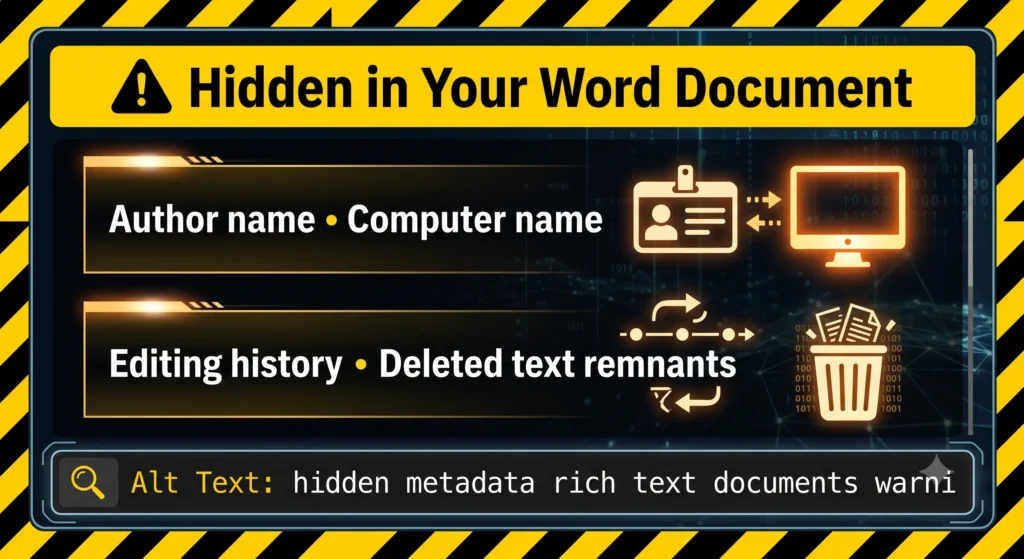
A standard Word document can quietly store the author’s name, the specific computer the document was created on, the exact amount of time spent editing it, and sometimes a full editing history. Have you ever deleted a harsh paragraph from a document before sending it to your boss? In some cases, remnants of previously deleted text or tracked changes that were never fully accepted can still be hiding in the file’s data. There have been massive real-world legal and confidentiality disasters caused by people sharing rich text files without realizing exactly what hidden history was traveling along with them.
There is also a practical size difference to consider. A chapter of a book written in plain text might take up only a tiny few kilobytes of storage. That exact same chapter saved as a rich text file can be dramatically larger, simply due to all the heavy, embedded formatting structure sitting underneath the words you actually see.
When Rich Text Is Actually the Right Choice
Now, none of this makes plain text universally superior in every situation. It is all about using the right tool for the right stage of your work.
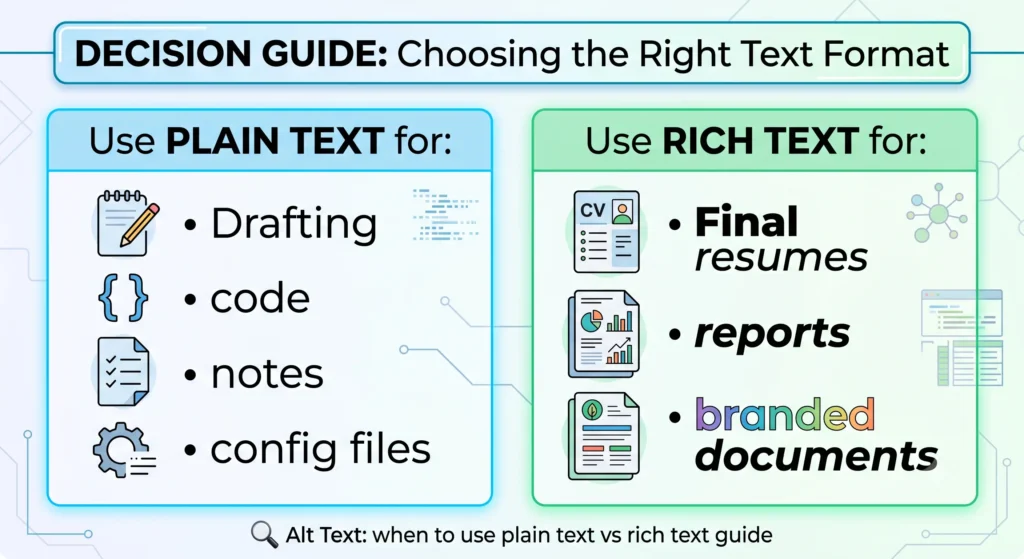
Final, polished documents that are meant for professional presentation like a beautifully designed resume, a corporate flyer, a formal academic report, or anything requiring specific branding and embedded images genuinely require rich formatting. Trying to force that kind of visual presentation into plain text would be impossible and counterproductive.
The practical rule of thumb to take from this guide is simple: Draft and think in plain text when you can, and apply rich formatting deliberately as a final step. Do not let formatting slow down your initial writing process.
Why Our Online Notepad Is Deliberately Plain Text
If you have used our Online Notepad at InnovaiTools, you might have noticed it is stripped down and simple. This is built as a plain text tool by design, not as a limitation.
Keeping it plain text guarantees that your captured thoughts, outlines, and notes look and behave identically no matter what device or browser you are using. It completely avoids the hidden metadata and privacy concerns we just covered. Most importantly, it keeps the tool blazing fast and genuinely distraction-free. It is meant for quick capture jotting down a brilliant headline or a rough paragraph without font choices getting in your way.
A Practical Workflow: Using Plain Text and Rich Text Together
Want to put this drafting principle into practice? Try this workflow for your next article or essay:
- Capture and Draft: Do your brain-dump and write your rough draft in a plain-text environment like our Online Notepad. Focus entirely on getting your ideas out.
- Adjust the Case: Once the content is written, you might realize your headers are messy. Use our Case Converter to instantly change your subheadings to proper Title Case or UPPERCASE as a distinct step.
- Format and Polish: Finally, copy that clean, perfectly cased plain text into WordPress, Google Docs, or Word. Now you can add your bolding, italics, images, and brand colors.
This keeps the “content first, formatting second” philosophy practical and highly efficient.
Common Mistakes When Thinking About Text Formats
- Mistake 1: Assuming a
.docxor rich text file will look identical when someone else opens it, without accounting for the fact that they might not have the same fonts or software versions installed. - Mistake 2: Not realizing that a shared rich text document can carry hidden metadata, like your full name or the exact editing history of the file, which you never intended to share.
- Mistake 3: Drafting a long, complex article directly inside a heavy rich-text editor and getting bogged down adjusting font sizes before the actual writing is finished.
- Mistake 4: Trying to use rich text for content that is meant to be processed by code, version control systems, or databases. These systems almost always require clean, unformatted plain text to function correctly.
Key Terms You Should Know
- Plain Text: A highly compatible file format containing only raw characters and line breaks, with absolute zero embedded formatting instructions.
- Rich Text: A file format containing your visible text alongside heavy embedded formatting instructions (like fonts, styles, colors), and sometimes images or hidden metadata.
- Metadata: Hidden information stored quietly within a file beyond its visible text. This can include the author’s name, the software used, creation dates, and editing history.
- Distraction-Free Writing: A popular productivity technique where a writer intentionally uses a stripped-down, plain-text environment to focus solely on the words rather than the visual layout.
- Version Control: A system (like Git) used by developers to track precise, line-by-line changes to files over time. It works brilliantly with plain text but struggles with the complex underlying code of rich text files.
Frequently Asked Questions
Q1: What is the main difference between plain text and rich text? Plain text contains only raw characters and line breaks, making it universally readable. Rich text contains the text plus an invisible layer of complex formatting instructions for things like fonts, colors, and bolding.
Q2: Why do software developers prefer plain text files? Developers use version control systems to track changes to their work. These systems can cleanly track changes to plain text line-by-line. Rich text files have too much hidden formatting code, making line-by-line tracking practically impossible.
Q3: Does a .txt file ever have compatibility or formatting problems? No. Because a plain text file contains zero formatting instructions, there is nothing for a different computer or operating system to misinterpret. It will display the exact same characters everywhere.
Q4: What kind of hidden information can a Word document contain? Rich text documents can carry metadata including the original author’s name, the computer used to create it, timestamps, and sometimes remnants of deleted text or unaccepted tracked changes.
Q5: Is Markdown considered plain text or rich text? Markdown is plain text. It uses simple keyboard symbols (like asterisks or hashtags) to indicate formatting. The file itself remains plain text, but compatible software knows how to visually render those symbols into bold text or headers.
Q6: Why do people recommend drafting in plain text before formatting? It separates the creative writing process from the visual design process. Removing the ability to tweak fonts and colors prevents distraction and helps writers achieve a “flow state” much faster.
Q7: Why does my perfectly formatted Word document look different on another computer? Rich text rendering relies on the receiving software correctly translating embedded formatting instructions. If the other computer is missing the font you used, or is running an older version of the software, it will guess how to display it, leading to broken layouts.
Q8: Is HTML plain text or rich text? The underlying HTML code file itself is plain text (just characters and tags). However, it is specifically designed to be read by a web browser, which interprets those tags to produce a rich, highly formatted visual web page.
Q9: Why is InnovaiTools’ Online Notepad plain text only? We made it plain text by deliberate design. It guarantees your notes load instantly, behave perfectly on any device, avoid all hidden metadata privacy risks, and keep you focused on getting your thoughts down without distraction.
Q10: Can I add formatting to plain text later? Absolutely. Plain text is the ultimate foundation. You can always write your content in plain text, paste it into WordPress or Word later, and add all the rich formatting you desire.
Final Thoughts
The gap between plain text and rich text isn’t just some boring technical footnote. It explains very real, everyday frustrations like why your resume’s formatting broke when you emailed it, or why you keep getting distracted by font choices instead of actually writing your essay.
Neither format is the “enemy.” Plain text is the undisputed champion of compatibility, focused drafting, and privacy. Rich text is the necessary tool for crafting a final, beautiful, polished presentation. Understanding the difference lets you use both to your advantage.
For fast, completely private, distraction-free drafting, use our Online Notepad at InnovaiTools any time inspiration strikes. And when you are ready to start prepping that text for publication, our Case Converter and Word & Character Counter pick up exactly where your drafting leaves off.

Arid is a web developer and computer expert who specializes in building practical utility web applications. With a strong focus on technical problem-solving and user experience, he develops efficient online calculators and writing tools designed to help students, bloggers, and professionals streamline their daily tasks.